基础
插桩编译
afl-gcc -g -o a a.c
./configure CC="afl-gcc" CXX="afl-g++" # autoconf
./configure --disable-shared CC="afl-gcc" CXX="afl-g++" # .so
开始fuzz
# -i 输入 -o 输出文件夹 从stdin读取输入
afl-fuzz -i testcase_dir -o findings_dir ./a

# 从文件读取输入 @@是占位符 表示替换的位置
./afl-fuzz -i testcase_dir -o findings_dir /path/to/program @@
eg afl-fuzz -m 300 -i ./zerotest/fuzz_in -o ./zerotest/fuzz_out ./zerotest/vuln -f
常见参数
-f testcase的内容会作为afl_test的stdin -m 分配的内存空间 -i 指定测试样本路径 -o 指定输出结果的路径 -t 设置程序运行超时值,单位为 ms -M 运行主(Master) Fuzzer -S 运行从属(Slave) Fuzzer /dev/null
启动文件选择
- 文件要小,理想小于1kb
- 只有当它们在功能上彼此不同时才使用多个测试用例
结果分析
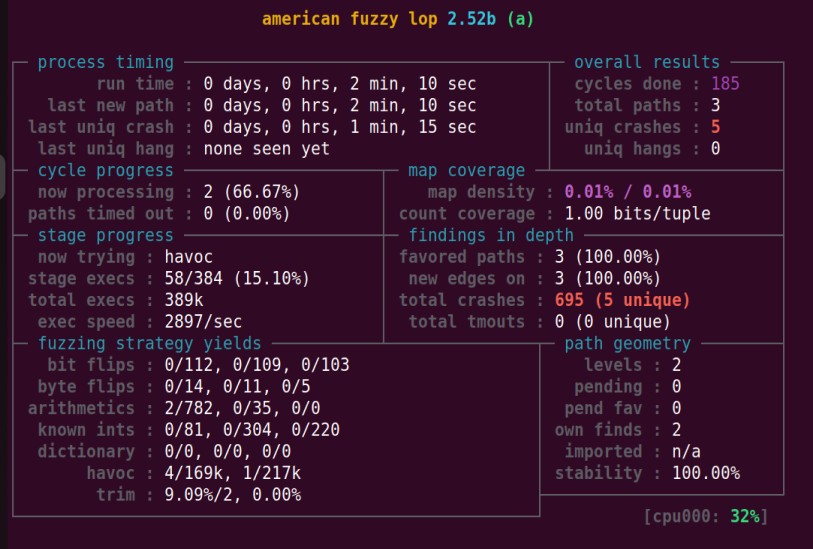
last new path 如果报错要及时修正命令行参数,否则继续fuzz也是徒劳(因为路径不会改变) cycles done 如果变绿就说明后面即使继续fuzz,出现crash的几率也很低了,可以选择停止 uniq crashes 代表crash的数量
afl-whatsup工具可以查看每个fuzzer的运行状态和总体运行概况,加上-s选项只显示概况,其中的数据都是所有fuzzer的总和 afl-gotcpu工具可以查看每个核心使用状态
停止afl-fuzz时机:
- 状态窗口的cycles done变为绿色
- afl-whatsup查看afl-fuzz状态
- afl-stat得到类似于afl-whatsup的输出结果
- 定制afl-whatsup->在所有代码外面加个循环就好
- 用afl-plot绘制各种状态指标的直观变化趋势
- pythia估算发现新crash和path概率。
fuzz结束判断
- cycles done变为绿色
- 距上一次发现新路径(或者崩溃)已经过去很长时间
- 目标程序的代码几乎被测试用例完全覆盖,这种情况很少见
- pythia提供的各种数据中,path covera达到99或者correctness的值达到1e-08(含义: 从上次发现path/uniq crash到下一次发现之间大约需要1亿次执行)
crash分析
ayoung@ay:~/fuzz_learn$ xxd findings_dir/crashes/id\:000000\,sig\:06\,src\:000000\,op\:havoc\,rep\:64
00000000: dabf 1fbf d0a9 bf18 cbda bfbf bfd0 a9bf  ................
00000010: 18cb bfda bfdb bfbf bfb4 bfbf bfbf d6bf  ................
00000020: ff80 babf bfbf bf86 0000 0100 bfbf bf00  ................
00000030: bff5 ffbf bb00 0083 1000 00df aabf bfbf  ................
00000040: 4343 4343 4343 4343 4343 43bf dabf dbbf  CCCCCCCCCCC.....
00000050: bfbf b4bf bfaa ddbf bfbf bbba bfbf bfba  ................
00000060: bfbf bf64 d89f 64bf bbba 0002 bfbf 7f80  ...d..d.........
00000070: babf bfbf bf86 0040 0100 bfbf bf00 bff5  .......@........
00000080: ffbf bb00 0083 1000 00df 2f              ........../
gdb内部执行
pwndbg> r < findings_dir/crashes/id:000000,sig:06,src:000000,op:havoc,rep:64
简化crash
ayoung@ay:~/fuzz_learn$ cat findings_dir/crashes/id\:000000\,sig\:06\,src\:000000\,op\:havoc\,rep\:64
ڿ�Щ��ڿ��Щ�˿ڿۿ�������ֿ�����������������ߪ���CCCCCCCCCCC�ڿۿ������ݿ�����������d؟d������������@����������/
ayoung@ay:~/fuzz_learn$ afl-tmin -i findings_dir/crashes/id\:000000\,sig\:06\,src\:000000\,op\:havoc\,rep\:64 -o minimized_crash -- ./a
afl-tmin 2.52b by <lcamtuf@google.com>

[+] Read 139 bytes from 'findings_dir/crashes/id:000000,sig:06,src:000000,op:havoc,rep:64'.
[*] Performing dry run (mem limit = 50 MB, timeout = 1000 ms)...
[+] Program exits with a signal, minimizing in crash mode.
[*] Stage #0: One-time block normalization...
[+] Block normalization complete, 139 bytes replaced.
[*] --- Pass #1 ---
[*] Stage #1: Removing blocks of data...
    Block length = 8, remaining size = 139
    Block length = 4, remaining size = 107
    Block length = 2, remaining size = 107
    Block length = 1, remaining size = 105
[+] Block removal complete, 34 bytes deleted.
[*] Stage #2: Minimizing symbols (1 code point)...
[+] Symbol minimization finished, 0 symbols (0 bytes) replaced.
[*] Stage #3: Character minimization...
[+] Character minimization done, 0 bytes replaced.
[*] --- Pass #2 ---
[*] Stage #1: Removing blocks of data...
    Block length = 8, remaining size = 105
    Block length = 4, remaining size = 105
    Block length = 2, remaining size = 105
    Block length = 1, remaining size = 105
[+] Block removal complete, 0 bytes deleted.

     File size reduced by : 24.46% (to 105 bytes)
    Characters simplified : 132.38%
     Number of execs done : 57
          Fruitless execs : path=16 crash=0 hang=0

[*] Writing output to 'minimized_crash'...
[+] We're done here. Have a nice day!

ayoung@ay:~/fuzz_learn$ cat minimized_crash
000000000000000000000000000000000000000000000000000000000000000000000000000000000000000000000000000000000
无源码测试
afl qemu-mode编译 gcc编译 afl-fuzz -i fuzz_in -o fuzz_out -Q ./afl_test2
llvm mode
可以获得更快的Fuzzing速度,针对大型项目可以考虑启用
语料库蒸馏
afl-cmin 移除执行相同代码的文件
afl-cmin -i input_dir -o output_dir -- /path/to/tested/program [params]
afl-cmin -i input_dir -o output_dir -- /path/to/tested/program [params] @@
afl-tmin 减小单个输入文件的大小 默认instrumented mode
# instrumented mode
afl-tmin -i input_file -o output_file -- /path/to/tested/program [params] @@
# crash mode 把导致程序非正常退出的文件直接剔除
afl-tmin -x -i input_file -o output_file -- /path/to/tested/program [params] @@
批量处理:
for i in id*
do
    afl-tmin -i $i -o tmin-$i -- ~/path/to/tested/program [params] @@
done
使用完afl-tmin后再次使用afl-cmin,可能可以再过滤掉一些用例