exercise1
本节学习:
- 编译带检测的目标程序
- 运行fuzzer
- 使用gdb分类crash
fuzz
xpdf环境搭好
ayoung@ubuntu:~/fuzzing_xpdf/pdf_examples$ $HOME/fuzzing_xpdf/install/bin/pdfinfo -box -meta small-example-pdf-file.pdf
Title:          Document1
Subject:
Keywords:
Author:         Administrator
Creator:        PDFCreator 2.0.2.0
Producer:       PDFCreator 2.0.2.0
CreationDate:   Sun Jul 26 00:25:22 2015
ModDate:        Sun Jul 26 00:25:22 2015
Tagged:         no
Pages:          1
Encrypted:      no
Page size:      595 x 842 pts (A4)
MediaBox:           0.00     0.00   595.00   842.00
CropBox:            0.00     0.00   595.00   842.00
BleedBox:           0.00     0.00   595.00   842.00
TrimBox:            0.00     0.00   595.00   842.00
ArtBox:             0.00     0.00   595.00   842.00
File size:      4107 bytes
Optimized:      yes
PDF version:    1.4
Metadata:
<?xpacket begin='' id='W5M0MpCehiHzreSzNTczkc9d'?>
<?adobe-xap-filters esc="CRLF"?>
<x:xmpmeta xmlns:x='adobe:ns:meta/' x:xmptk='XMP toolkit 2.9.1-13, framework 1.6'>
<rdf:RDF xmlns:rdf='http://www.w3.org/1999/02/22-rdf-syntax-ns#' xmlns:iX='http://ns.adobe.com/iX/1.0/'>
<rdf:Description rdf:about='uuid:7b7ff4e7-3534-11e5-0000-1d06e6d9e022' xmlns:pdf='http://ns.adobe.com/pdf/1.3/'><pdf:Producer>PDFCreator 2.0.2.0</pdf:Producer>
<pdf:Keywords></pdf:Keywords>
</rdf:Description>
<rdf:Description rdf:about='uuid:7b7ff4e7-3534-11e5-0000-1d06e6d9e022' xmlns:xmp='http://ns.adobe.com/xap/1.0/'><xmp:ModifyDate>2015-07-26T00:25:22+10:00</xmp:ModifyDate>
<xmp:CreateDate>2015-07-26T00:25:22+10:00</xmp:CreateDate>
<xmp:CreatorTool>PDFCreator 2.0.2.0</xmp:CreatorTool></rdf:Description>
<rdf:Description rdf:about='uuid:7b7ff4e7-3534-11e5-0000-1d06e6d9e022' xmlns:xapMM='http://ns.adobe.com/xap/1.0/mm/' xapMM:DocumentID='uuid:7b7ff4e7-3534-11e5-0000-1d06e6d9e022'/>
<rdf:Description rdf:about='uuid:7b7ff4e7-3534-11e5-0000-1d06e6d9e022' xmlns:dc='http://purl.org/dc/elements/1.1/' dc:format='application/pdf'><dc:title><rdf:Alt><rdf:li xml:lang='x-default'>Document1</rdf:li></rdf:Alt></dc:title><dc:creator><rdf:Seq><rdf:li>Administrator</rdf:li></rdf:Seq></dc:creator><dc:description><rdf:Alt><rdf:li xml:lang='x-default'></rdf:li></rdf:Alt></dc:description></rdf:Description>
</rdf:RDF>
</x:xmpmeta>


<?xpacket end='w'?>
文档写的安装步骤llvm版本过低 使用llvm-13
wget https://apt.llvm.org/llvm.sh
chmod +x llvm.sh
sudo ./llvm.sh 13 all
踩坑:一直显示llvm mode编译失败,发现报错
fatal error: 'list' file not found
#include <list>
         ^~~~~~
1 error generated.
make[1]: *** [GNUmakefile.llvm:436: instrumentation/afl-llvm-common.o] Error 1
make[1]: Leaving directory '/home/ayoung/AFLplusplus'
make: [GNUmakefile:347: llvm] Error 2 (ignored)
缺库
添加源sudo add-apt-repository ppa:ubuntu-toolchain-r/test 并update
安装sudo apt install libstdc++-13-dev
开始fuzz
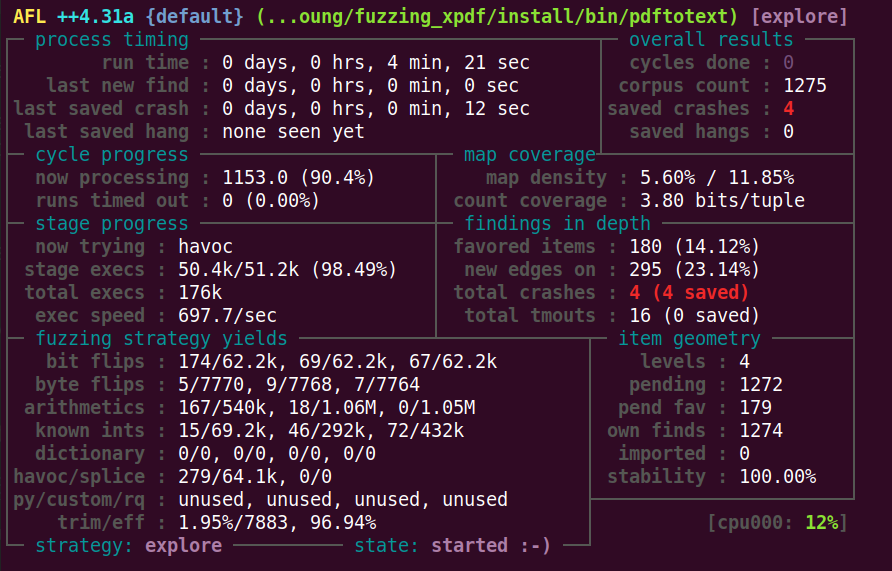
afl-fuzz -i $HOME/fuzzing_xpdf/pdf_examples/ -o $HOME/fuzzing_xpdf/out/ -s 123 -- $HOME/fuzzing_xpdf/install/bin/pdftotext @@ $HOME/fuzzing_xpdf/output
-i 输入
-o 输出
-s 使用的静态随机种子
 @@ 命令占位符
用afl-tmin缩小一下crash样本
afl-tmin -i ../out/default/crashes/id\:000000\,sig\:11\,src\:000000\,time\:126030\,execs\:85533\,op\:havoc\,rep\:2 -o a -- $HOME/fuzzing_xpdf/install/bin/pdftotext @@ $HOME/fuzzing_xpdf/output
得到
ayoung@ubuntu:~/fuzzing_xpdf/xpdf-3.02$ cat a
trailer<</Root 5 0R
5 0 obj<<
7 0 obj<</Length 7 0R/>streama
crash分析
重新编译debug版本的
cd $HOME/fuzzing_xpdf/xpdf-3.02/
make clean
CFLAGS="-g -O0" CXXFLAGS="-g -O0"
make
启动gdb
gdb --args $HOME/fuzzing_xpdf/xpdf-3.02/xpdf/pdftotext out/default/crashes/a $HOME/fuzzing_xpdf/output
bt查看栈回溯 看着就是陷入循环了
pwndbg> bt
#0  __vfprintf_internal (s=s@entry=0x7fffff7ff590, format=0x507d50 "Error (%d): ", ap=0x7fffff801c50, mode_flags=0) at vfprintf-internal.c:1365
#1  0x00007ffff7a43ea2 in buffered_vfprintf (s=s@entry=0x7ffff7bb75c0 <_IO_2_1_stderr_>, format=format@entry=0x507d50 "Error (%d): ", args=args@entry=0x7fffff801c50, mode_flags=mode_flags@entry=0) at vfprintf-internal.c:2377
#2  0x00007ffff7a40d24 in __vfprintf_internal (s=0x7ffff7bb75c0 <_IO_2_1_stderr_>, format=0x507d50 "Error (%d): ", ap=ap@entry=0x7fffff801c50, mode_flags=mode_flags@entry=0) at vfprintf-internal.c:1346
#3  0x00007ffff7a2bc6a in __fprintf (stream=<optimized out>, format=<optimized out>) at fprintf.c:32
#4  0x0000000000418b30 in error (pos=53, msg=0x50f0d0 "Illegal character '>'") at Error.cc:29
#5  0x0000000000495413 in Lexer::getObj (this=0x1eb13b0, obj=0x1eb1388) at Lexer.cc:424
#6  0x000000000049f792 in Parser::getObj (this=this@entry=0x1eb1360, obj=<optimized out>, obj@entry=0x7fffff801f68, fileKey=fileKey@entry=0x0, encAlgorithm=encAlgorithm@entry=cryptRC4, keyLength=keyLength@entry=0, objNum=objNum@entry=7, objGen=0) at Parser.cc:226
#7  0x000000000049f475 in Parser::getObj (this=0x1eb1360, obj=<optimized out>, fileKey=0x0, encAlgorithm=cryptRC4, keyLength=0, objNum=7, objGen=0) at Parser.cc:85
#8  0x00000000004d07c6 in XRef::fetch (this=0x7a25d0, num=7, gen=0, obj=0x7fffff802078) at XRef.cc:823
#9  0x000000000049fd14 in Object::dictLookup (this=0x7fffff802208, key=0x25 <error: Cannot access memory at address 0x25>, obj=0x7fffff802078) at ./Object.h:253
#10 Parser::makeStream (this=this@entry=0x1eb0ee0, dict=dict@entry=0x7fffff802208, fileKey=fileKey@entry=0x0, encAlgorithm=encAlgorithm@entry=cryptRC4, keyLength=keyLength@entry=0, objNum=objNum@entry=7, objGen=0) at Parser.cc:156
#11 0x000000000049f6eb in Parser::getObj (this=0x1eb0ee0, obj=<optimized out>, fileKey=0x0, encAlgorithm=cryptRC4, keyLength=0, objNum=7, objGen=0) at Parser.cc:94
#12 0x00000000004d07c6 in XRef::fetch (this=0x7a25d0, num=7, gen=0, obj=0x7fffff802208) at XRef.cc:823
#13 0x000000000049fd14 in Object::dictLookup (this=0x7fffff802398, key=0x25 <error: Cannot access memory at address 0x25>, obj=0x7fffff802208) at ./Object.h:253
#14 Parser::makeStream (this=this@entry=0x1eb0a60, dict=dict@entry=0x7fffff802398, fileKey=fileKey@entry=0x0, encAlgorithm=encAlgorithm@entry=cryptRC4, keyLength=keyLength@entry=0, objNum=objNum@entry=7, objGen=0) at Parser.cc:156
makeStream()-> dictLookup() -> fetch() -> getObj()
exercise2
本节学习:
- 使用外部应用来fuzz一个库
- 使用afl-clang-lto,这是个无冲突检测工具,比afl-clang-fast更快 提供更好的结果
fuzz
ayoung@ayoung:~/fuzzing_libexif$ ./install/bin/exif exif-samples/jpg/tests/11-tests.jpg
EXIF tags in 'exif-samples/jpg/tests/11-tests.jpg' ('Intel' byte order):
--------------------+----------------------------------------------------------
Tag                 |Value
--------------------+----------------------------------------------------------
Manufacturer        |Canon
Model               |Canon DIGITAL IXUS 40
Date and Time       |2007:09:03 16:03:45
YCbCr Positioning   |centered
RelatedImageWidth   |2272
RelatedImageLength  |1704
Custom Rendered     |Normal process
Exposure Mode       |Auto exposure
White Balance       |Auto white balance
Digital Zoom Ratio  |1.00
Scene Capture Type  |Standard
Exposure Time       |1/500 sec.
FNumber             |f/2.8
Exif Version        |Exif Version 2.2
Date and Time (origi|2007:09:03 16:03:45
Date and Time (digit|2007:09:03 16:03:45
ComponentsConfigurat|Y Cb Cr -
Compressed Bits per |3.00
Shutter speed       |8.97 EV (APEX: 22, 1/501 sec.)
Aperture            |2.97 EV (f/2.8)
Exposure Bias       |0.00 EV
MaxApertureValue    |2.97 EV (f/2.8)
Metering Mode       |Pattern
Flash               |Flash did not fire, auto mode.
Focal Length        |5.8 mm
Maker Note          |1176 bytes unknown data
User Comment        |
FlashPixVersion     |FlashPix Version 1.0
Color Space         |sRGB
PixelXDimension     |2272
PixelYDimension     |1704
Focal Plane x-Resolu|10142.86
Focal Plane y-Resolu|10142.86
Focal Plane Resoluti|Inch
Sensing Method      |One-chip color area sensor
File Source         |DSC
--------------------+----------------------------------------------------------
alf-clang-fast和alf-clang-lto区别: afl-clang-lto 无碰撞检测 比alf-clang-fast更快并提供更好的结果 对于这些编译器在何种情况下使用 给出下面解读
+--------------------------------+
| clang/clang++ 11+ is available | --> use LTO mode (afl-clang-lto/afl-clang-lto++)
+--------------------------------+     see [instrumentation/README.lto.md](instrumentation/README.lto.md)
    |
    | if not, or if the target fails with LTO afl-clang-lto/++
    |
    v
+---------------------------------+
| clang/clang++ 6.0+ is available | --> use LLVM mode (afl-clang-fast/afl-clang-fast++)
+---------------------------------+     see [instrumentation/README.llvm.md](instrumentation/README.llvm.md)
    |
    | if not, or if the target fails with LLVM afl-clang-fast/++
    |
    v
 +--------------------------------+
 | gcc 5+ is available            | -> use GCC_PLUGIN mode (afl-gcc-fast/afl-g++-fast)
 +--------------------------------+    see [instrumentation/README.gcc_plugin.md](instrumentation/README.gcc_plugin.md) and
                                       [instrumentation/README.instrument_list.md](instrumentation/README.instrument_list.md)
    |
    | if not, or if you do not have a gcc with plugin support
    |
    v
   use GCC mode (afl-gcc/afl-g++) (or afl-clang/afl-clang++ for clang)
插桩编译
# 重新编译 libexif
rm -r $HOME/fuzzing_libexif/install
cd $HOME/fuzzing_libexif/libexif-0.6.14/
make clean
export LLVM_CONFIG="llvm-config-13"
CC=afl-clang-lto ./configure --enable-shared=no --prefix="$HOME/fuzzing_libexif/install/"
make
make install

# 重新编译 exif
cd $HOME/fuzzing_libexif/exif-0.6.15
make clean
export LLVM_CONFIG="llvm-config-11"
CC=afl-clang-lto ./configure --enable-shared=no --prefix="$HOME/fuzzing_libexif/install/" PKG_CONFIG_PATH=$HOME/fuzzing_libexif/install/lib/pkgconfig
make
make install
sudo su
echo core >/proc/sys/kernel/core_pattern # 设置core dump文件名为静态core
exit

afl-fuzz -i $HOME/fuzzing_libexif/exif-samples/jpg/ -o $HOME/fuzzing_libexif/out/ -s 123 -- $HOME/fuzzing_libexif/install/bin/exif @@
编译带调试信息的程序 源码调试
# libexif
rm -r $HOME/fuzzing_libexif/install
cd $HOME/fuzzing_libexif/libexif-0.6.14/
make clean
CFLAGS="-g -O0" CXXFLAGS="-g -O0" ./configure --enable-shared=no --prefix="$HOME/fuzzing_libexif/install/"
make
make install

# exif
cd $HOME/fuzzing_libexif/exif-0.6.15
make clean
CFLAGS="-g -O0" CXXFLAGS="-g -O0" PKG_CONFIG_PATH=$HOME/fuzzing_libexif/install/lib/pkgconfig ./configure --enable-shared=no --prefix="$HOME/fuzzing_libexif/install/"
make
make install
crash分析
看到两种崩溃点 下面crash样本经过简化处理
ayoung@ayoung:~/fuzzing_libexif$ cat out/default/simple/res1  |xxd
00000000: e000 1030 3030 3030 3030 3030 3030 3030  ...0000000000000
00000010: 30e1 3030 4578 6966 0000 4d4d 002a ffff  0.00Exif..MM.*..
00000020: ffff
crash1 取值时指针异常
pwndbg> x/i $rip
=> 0x561d59dc7e54 <exif_get_sshort+47>: movzx  eax,BYTE PTR [rax]
pwndbg> p buf
$1 = (const unsigned char *) 0x561e5c4f88e5 <error: Cannot access memory at address 0x561e5c4f88e5>
pwndbg> bt
#0  0x0000561d59dc7e54 in exif_get_sshort (buf=0x561e5c4f88e5 <error: Cannot access memory at address 0x561e5c4f88e5>, order=EXIF_BYTE_ORDER_MOTOROLA) at exif-utils.c:92
#1  0x0000561d59dc7ebd in exif_get_short (buf=0x561e5c4f88e5 <error: Cannot access memory at address 0x561e5c4f88e5>, order=EXIF_BYTE_ORDER_MOTOROLA) at exif-utils.c:104
#2  0x0000561d59dbedbb in exif_data_load_data (data=0x561d5c4f67b0, d_orig=0x561d5c4f88e0 "Exif", ds_orig=14) at exif-data.c:819
#3  0x0000561d59dc686f in exif_loader_get_data (loader=0x561d5c4f6760) at exif-loader.c:387
#4  0x0000561d59dba02c in main (argc=2, argv=0x7fff785329d8) at main.c:438
#5  0x00007f3b58bd5d90 in __libc_start_call_main (main=main@entry=0x561d59db9673 <main>, argc=argc@entry=2, argv=argv@entry=0x7fff785329d8) at ../sysdeps/nptl/libc_start_call_main.h:58
#6  0x00007f3b58bd5e40 in __libc_start_main_impl (main=0x561d59db9673 <main>, argc=2, argv=0x7fff785329d8, init=<optimized out>, fini=<optimized out>, rtld_fini=<optimized out>, stack_end=0x7fff785329c8) at ../csu/libc-start.c:392
#7  0x0000561d59db77a5 in _start ()
参考现有分析 断点下到exif-data.c:816
if (offset + 6 + 2 > ds) {
        return;
}
n = exif_get_short (d + 6 + offset, data->priv->order);
pwndbg> p/x offset
$3 = 0xffffffff
pwndbg> p/x offset+6+2
$6 = 0x7
pwndbg> p/x ds
$4 = 0xe
32位整数溢出 回环后绕过了检查,但后续传入函数的是地址 造成了越界 访问到不可访问地址
而exif_get_short()函数作用是从buf处获取16位整数 并按照对应字节序解析
定义如下
ExifSShort
exif_get_sshort (const unsigned char *buf, ExifByteOrder order)
{
	if (!buf) return 0;
        switch (order) {
        case EXIF_BYTE_ORDER_MOTOROLA:
                return ((buf[0] << 8) | buf[1]);
        case EXIF_BYTE_ORDER_INTEL:
                return ((buf[1] << 8) | buf[0]);
        }

	/* Won't be reached */
	return (0);
}

ExifShort
exif_get_short (const unsigned char *buf, ExifByteOrder order)
{
	return (exif_get_sshort (buf, order) & 0xffff);
}
crash2 堆溢出
ayoung@ayoung:~/fuzzing_libexif$ cat out/default/simple/res2
00ExifII000000000000000000000000000000000000000000000000000000000000000000000000000000000000000000000000000000000000000000000000000000000000000000000000000000000000000000000000000000000000000000000000000000000000000000000000000000000000000000000000000000000000000000000000000000000000000000000000000000000000000000000000000000000000000000000000000000000000000000000000000000000000000000000000000000000000000000000000000000000000000000000000000000000000000000000000000000000000000000000000000000000000000000000000000000000000000000000000000000000000000000000000000000000000000000000000000000000000000000000000000000000000000000000000000000000000000000000000000000000000000000000000000000000000000000000000000000000000000000000000000000000000000000000000000000000000000000000000000000000000000000000000000����
pwndbg> x/i $rip
=> 0x7f4437cd7398 <__memmove_evex_unaligned_erms+1496>: vmovdqu64 ymm20,YMMWORD PTR [rsi+0x1000]
pwndbg> x/10gx $rsi+0x1000
0x556ed3c20946: Cannot access memory at address 0x556ed3c20946
pwndbg> vmmap 0x556ed3c1f946
LEGEND: STACK | HEAP | CODE | DATA | WX | RODATA
             Start                End Perm     Size Offset File
    0x556eb4c19000     0x556eb4c1a000 rw-p     1000      0 [anon_556eb4c19]
►   0x556ed3bff000     0x556ed3c20000 rw-p    21000      0 [heap] +0x20946
    0x7f4337513000     0x7f4437514000 rw-p 100001000      0 [anon_7f4337513]
pwndbg> bt
#0  __memmove_evex_unaligned_erms () at ../sysdeps/x86_64/multiarch/memmove-vec-unaligned-erms.S:872
#1  0x0000556eb4bec3d9 in exif_data_load_data_thumbnail (data=0x556ed3c017b0, d=0x556ed3c038e6 "II*", ds=814, offset=48, size=4294967295) at exif-data.c:292
#2  0x0000556eb4bec8f8 in exif_data_load_data_content (data=0x556ed3c017b0, ifd=EXIF_IFD_0, d=0x556ed3c038e6 "II*", ds=814, offset=10, recursion_depth=0) at exif-data.c:381
#3  0x0000556eb4bedd8a in exif_data_load_data (data=0x556ed3c017b0, d_orig=0x556ed3c038e0 "Exif", ds_orig=820) at exif-data.c:813
#4  0x0000556eb4bf586f in exif_loader_get_data (loader=0x556ed3c01760) at exif-loader.c:387
#5  0x0000556eb4be902c in main (argc=2, argv=0x7fff048b5848) at main.c:438
#6  0x00007f4437b51d90 in __libc_start_call_main (main=main@entry=0x556eb4be8673 <main>, argc=argc@entry=2, argv=argv@entry=0x7fff048b5848) at ../sysdeps/nptl/libc_start_call_main.h:58
#7  0x00007f4437b51e40 in __libc_start_main_impl (main=0x556eb4be8673 <main>, argc=2, argv=0x7fff048b5848, init=<optimized out>, fini=<optimized out>, rtld_fini=<optimized out>, stack_end=0x7fff048b5838) at ../csu/libc-start.c:392
#8  0x0000556eb4be67a5 in _start ()
在往上找 发现溢出点
 ► 0x55f1031843d4 <exif_data_load_data_thumbnail+248>    call   memcpy@plt                  <memcpy@plt>
        dest: 0x7fe5dd12f010 ◂— 0
        src: 0x55f13138b916 ◂— 0x3030303030303030 ('00000000')
        n: 0xffffffff
和crash1类似 都是进行边界检查的时候出现整数溢出 造成越界
static void
exif_data_load_data_thumbnail (ExifData *data, const unsigned char *d,
			       unsigned int ds, ExifLong offset, ExifLong size)
{
	if (ds < offset + size) {
		exif_log (data->priv->log, EXIF_LOG_CODE_DEBUG, "ExifData",
			  "Bogus thumbnail offset and size: %i < %i + %i.",
			  (int) ds, (int) offset, (int) size);
		return;
	}
	if (data->data)
		exif_mem_free (data->priv->mem, data->data);
	data->size = size;
	data->data = exif_data_alloc (data, data->size);
	if (!data->data)
		return;
	memcpy (data->data, d + offset, data->size);
}
pwndbg> p/x ds
$10 = 0x32e
pwndbg> p/x offset
$11 = 0x30
pwndbg> p/x size
$12 = 0xffffffff
pwndbg> p/x size+offset
$14 = 0x2f
从而发现 第一个if条件由于整数溢出 没有被判断出问题 后续memcpy长度过长,在拷贝源数据的过程中发生越界读取造成崩溃
exercise3
本节学习:
- 什么是运行时内存错误检测工具ASan
- 如何使用ASAN fuzz目标
- 使用ASan分类crash有多容易
fuzz
编译略
ayoung@ayoung:~/fuzzing_tcpdump/tcpdump-4.9.2$ $HOME/fuzzing_tcpdump/install/sbin/tcpdump -h
tcpdump version 4.9.2
libpcap version 1.8.0
OpenSSL 3.0.2 15 Mar 2022
Usage: tcpdump [-aAbdDefhHIJKlLnNOpqStuUvxX#] [ -B size ] [ -c count ]
                [ -C file_size ] [ -E algo:secret ] [ -F file ] [ -G seconds ]
                [ -i interface ] [ -j tstamptype ] [ -M secret ] [ --number ]
                [ -Q in|out|inout ]
                [ -r file ] [ -s snaplen ] [ --time-stamp-precision precision ]
                [ --immediate-mode ] [ -T type ] [ --version ] [ -V file ]
                [ -w file ] [ -W filecount ] [ -y datalinktype ] [ -z postrotate-command ]
                [ -Z user ] [ expression ]
文件夹下有样例
ayoung@ayoung:~/fuzzing_tcpdump/tcpdump-4.9.2$ $HOME/fuzzing_tcpdump/install/sbin/tcpdump -vvvvXX -ee -nn -r ./tests/geneve.pcap
reading from file ./tests/geneve.pcap, link-type EN10MB (Ethernet)
22:04:33.817203 00:1b:21:3c:ab:64 > 00:1b:21:3c:ac:30, ethertype IPv4 (0x0800), length 156: (tos 0x0, ttl 64, id 57261, offset 0, flags [DF], proto UDP (17), length 142)
    20.0.0.1.12618 > 20.0.0.2.6081: [no cksum] Geneve, Flags [C], vni 0xa, proto TEB (0x6558), options [class Standard (0x0) type 0x80(C) len 8 data 0000000c]
        b6:9e:d2:49:51:48 > fe:71:d8:83:72:4f, ethertype IPv4 (0x0800), length 98: (tos 0x0, ttl 64, id 48546, offset 0, flags [DF], proto ICMP (1), length 84)
    30.0.0.1 > 30.0.0.2: ICMP echo request, id 10578, seq 23, length 64
        0x0000:  001b 213c ac30 001b 213c ab64 0800 4500  ..!<.0..!<.d..E.
        0x0010:  008e dfad 4000 4011 32af 1400 0001 1400  ....@.@.2.......
        0x0020:  0002 314a 17c1 007a 0000 0240 6558 0000  ..1J...z...@eX..
        0x0030:  0a00 0000 8001 0000 000c fe71 d883 724f  ...........q..rO
        0x0040:  b69e d249 5148 0800 4500 0054 bda2 4000  ...IQH..E..T..@.
        0x0050:  4001 4104 1e00 0001 1e00 0002 0800 2c54  @.A...........,T
        0x0060:  2952 0017 f1a2 ce54 0000 0000 1778 0c00  )R.....T.....x..
        0x0070:  0000 0000 1011 1213 1415 1617 1819 1a1b  ................
        0x0080:  1c1d 1e1f 2021 2223 2425 2627 2829 2a2b  .....!"#$%&'()*+
        0x0090:  2c2d 2e2f 3031 3233 3435 3637            ,-./01234567
        ...
AddressSanitizer(ASan)是C和C++快速内存错误检测器 由编译器插桩模块和运行库组成,能够发现堆栈和全局对象越界访问,以及uaf、double free和内存泄露错误
接下来使用Asan编译
cd $HOME/fuzzing_tcpdump/libpcap-1.8.0/
export LLVM_CONFIG="llvm-config-13"
CC=afl-clang-lto ./configure --enable-shared=no --prefix="$HOME/fuzzing_tcpdump/install/"
AFL_USE_ASAN=1 make

cd $HOME/fuzzing_tcpdump/tcpdump-4.9.2/
AFL_USE_ASAN=1 CC=afl-clang-lto ./configure --prefix="$HOME/fuzzing_tcpdump/install/"
AFL_USE_ASAN=1 make
AFL_USE_ASAN=1 make install
显示由ASan编译
ayoung@ayoung:~/fuzzing_tcpdump/tcpdump-4.9.2$ ./tcpdump -h
tcpdump version 4.9.2
libpcap version 1.8.0
OpenSSL 3.0.2 15 Mar 2022
Compiled with AddressSanitizer/CLang.
Usage: tcpdump [-aAbdDefhHIJKlLnNOpqStuUvxX#] [ -B size ] [ -c count ]
                [ -C file_size ] [ -E algo:secret ] [ -F file ] [ -G seconds ]
                [ -i interface ] [ -j tstamptype ] [ -M secret ] [ --number ]
                [ -Q in|out|inout ]
                [ -r file ] [ -s snaplen ] [ --time-stamp-precision precision ]
                [ --immediate-mode ] [ -T type ] [ --version ] [ -V file ]
                [ -w file ] [ -W filecount ] [ -y datalinktype ] [ -z postrotate-command ]
                [ -Z user ] [ expression ]
开始fuzz
afl-fuzz -m none -i tcpdump-4.9.2/tests/ -o out/ -s 123 -- $HOME/fuzzing_tcpdump/install/sbin/tcpdump -vvvvXX -ee -nn -r @@
crash分析
跑了将近一天跑出10个crash
先尝试使用alf-tmin简化crash时碰到一个报错:
ayoung@ayoung:~/fuzzing_tcpdump/out/default/crashes$ afl-tmin -i ./id\:000000\,sig\:06\,src\:007302\,time\:34124764\,execs\:6059862\,op\:flip1\,pos\:16 -o 1 -- $HOME/fuzzing_tcpdump/install/sbin/tcpdump -vvvvXX -ee -nn -r @@
afl-tmin++4.32c by Michal Zalewski

[+] Read 5536 bytes from './id:000000,sig:06,src:007302,time:34124764,execs:6059862,op:flip1,pos:16'.
[*] Spinning up the fork server...

[-] PROGRAM ABORT : AFL_MAP_SIZE is not set and fuzzing target reports that the required size is very large. Solution: Run the fuzzing target stand-alone with the environment variable AFL_DUMP_MAP_SIZE=1 set the displayed value in the AFL_MAP_SIZE environment variable for afl-fuzz.
         Location : report_error_and_exit(), src/afl-forkserver.c:495
错误表明AFL++的共享内存大小(AFL_MAP_SIZE)未设置,而目标程序tcpdump需要更大的内存空间来记录代码覆盖率
AFL_MAP_SIZE默认64KB,当目标程序检测到默认空间不足就需要增大AFL_MAP_SIZE
确定所需的空间大小:
ayoung@ayoung:~/fuzzing_tcpdump/out/default/crashes$ AFL_DUMP_MAP_SIZE=1 $HOME/fuzzing_tcpdump/install/sbin/tcpdump -vvvvXX -ee -nn -r /dev/null
85601
之后运行afl-tmin时带上该环境变量,使用脚本批量简化
for i in id*
do
    AFL_MAP_SIZE=262144 afl-tmin -i $i -o tmin-$i -- $HOME/fuzzing_tcpdump/install/sbin/tcpdump -vvvvXX -ee -nn -r @@
done
运行crash,ASAN报堆溢出错误
==2526776==ERROR: AddressSanitizer: heap-buffer-overflow on address 0x61200000015b at pc 0x00000039dde6 bp 0x7ffc098f7200 sp 0x7ffc098f69a8
READ of size 4 at 0x61200000015b thread T0
    #0 0x39dde5 in MemcmpInterceptorCommon(void*, int (*)(void const*, void const*, unsigned long), void const*, void const*, unsigned long) crtstuff.c
    #1 0x39e2d9 in memcmp (/home/ayoung/fuzzing_tcpdump/install/sbin/tcpdump+0x39e2d9)
    #2 0x4af354 in bootp_print /home/ayoung/fuzzing_tcpdump/tcpdump-4.9.2/./print-bootp.c:382:6
    #3 0x531f38 in ip_print_demux /home/ayoung/fuzzing_tcpdump/tcpdump-4.9.2/./print-ip.c:402:3
    #4 0x535b7a in ip_print /home/ayoung/fuzzing_tcpdump/tcpdump-4.9.2/./print-ip.c:673:3
    #5 0x4ebe1e in ethertype_print /home/ayoung/fuzzing_tcpdump/tcpdump-4.9.2/./print-ether.c:333:10
    #6 0x4ea92e in ether_print /home/ayoung/fuzzing_tcpdump/tcpdump-4.9.2/./print-ether.c:236:7
    #7 0x4482ca in pretty_print_packet /home/ayoung/fuzzing_tcpdump/tcpdump-4.9.2/./print.c:332:18
    #8 0x4482ca in print_packet /home/ayoung/fuzzing_tcpdump/tcpdump-4.9.2/./tcpdump.c:2497:2
    #9 0x818a4a in pcap_offline_read /home/ayoung/fuzzing_tcpdump/libpcap-1.8.0/./savefile.c:523:4
    #10 0x441452 in pcap_loop /home/ayoung/fuzzing_tcpdump/libpcap-1.8.0/./pcap.c:904:8
    #11 0x441452 in main /home/ayoung/fuzzing_tcpdump/tcpdump-4.9.2/./tcpdump.c:2000:12
    #12 0x7f728571cd8f in __libc_start_call_main csu/../sysdeps/nptl/libc_start_call_main.h:58:16
    #13 0x7f728571ce3f in __libc_start_main csu/../csu/libc-start.c:392:3
    #14 0x385904 in _start (/home/ayoung/fuzzing_tcpdump/install/sbin/tcpdump+0x385904)

0x61200000015b is located 0 bytes to the right of 283-byte region [0x612000000040,0x61200000015b)
allocated by thread T0 here:
    #0 0x4027ed in malloc (/home/ayoung/fuzzing_tcpdump/install/sbin/tcpdump+0x4027ed)
    #1 0x81a0ea in pcap_check_header /home/ayoung/fuzzing_tcpdump/libpcap-1.8.0/./sf-pcap.c:401:14
    #2 0x817d59 in pcap_fopen_offline_with_tstamp_precision /home/ayoung/fuzzing_tcpdump/libpcap-1.8.0/./savefile.c:396:7
    #3 0x817a58 in pcap_open_offline_with_tstamp_precision /home/ayoung/fuzzing_tcpdump/libpcap-1.8.0/./savefile.c:303:6

SUMMARY: AddressSanitizer: heap-buffer-overflow crtstuff.c in MemcmpInterceptorCommon(void*, int (*)(void const*, void const*, unsigned long), void const*, void const*, unsigned long)
Shadow bytes around the buggy address:
  0x0c247fff7fd0: 00 00 00 00 00 00 00 00 00 00 00 00 00 00 00 00
  0x0c247fff7fe0: 00 00 00 00 00 00 00 00 00 00 00 00 00 00 00 00
  0x0c247fff7ff0: 00 00 00 00 00 00 00 00 00 00 00 00 00 00 00 00
  0x0c247fff8000: fa fa fa fa fa fa fa fa 00 00 00 00 00 00 00 00
  0x0c247fff8010: 00 00 00 00 00 00 00 00 00 00 00 00 00 00 00 00
=>0x0c247fff8020: 00 00 00 00 00 00 00 00 00 00 00[03]fa fa fa fa
  0x0c247fff8030: fa fa fa fa fa fa fa fa fa fa fa fa fa fa fa fa
  0x0c247fff8040: fa fa fa fa fa fa fa fa fa fa fa fa fa fa fa fa
  0x0c247fff8050: fa fa fa fa fa fa fa fa fa fa fa fa fa fa fa fa
  0x0c247fff8060: fa fa fa fa fa fa fa fa fa fa fa fa fa fa fa fa
  0x0c247fff8070: fa fa fa fa fa fa fa fa fa fa fa fa fa fa fa fa
[03]表示对应的8字节内存中只有前3字节是合法的
asan影子内存标记值及其含义如下 每个影子字节映射到应用程序8字节内存
| Shadow Byte 值 | 内存状态 | 解释 |
|---|---|---|
00 | Addressable | 内存可安全访问(完全初始化) |
01-07 | Partially addressable | 仅部分字节可访问(如结构体中的未填充区域) |
fa | Heap left redzone | 堆内存左侧红区(用于检测溢出) |
fd | Freed heap region | 已释放的堆内存(检测"释放后使用"错误) |
f1-f3 | Stack redzones | 栈内存保护区域(检测栈溢出) |
f5 | Stack after return | 函数返回后的栈空间(检测"返回后使用"错误) |
f8 | Stack use after scope | 作用域结束后的栈变量(检测"作用域外使用"错误) |
f9 | Global redzone | 全局变量保护区域 |
fc | Container overflow | 容器(如数组)溢出 |
ac | Array cookie | 数组边界校验符 |
fe | ASan internal | ASan 内部使用的保留区域 |
exercise4
本节学习:
- 如何使用LCOV测量代码覆盖率
- 如何使用代码覆盖率数据提高fuzz有效性
fuzz
同样带样例,带各种标志是为了提高代码覆盖率 增加发现bug机会
ayoung@ayoung:~/fuzzing_tiff/tiff-4.0.4$ $HOME/fuzzing_tiff/install/bin/tiffinfo -D -j -c -r -s -w $HOME/fuzzing_tiff/tiff-4.0.4/test/images/palette-1c-1b.tiff
TIFF Directory at offset 0xbd4 (3028)
  Image Width: 157 Image Length: 151
  Bits/Sample: 1
  Sample Format: unsigned integer
  Compression Scheme: None
  Photometric Interpretation: palette color (RGB from colormap)
  Samples/Pixel: 1
  Rows/Strip: 409
  Planar Configuration: single image plane
  Page Number: 0-1
  Color Map:
       0:     0     0     0
       1: 65535 65535 65535
  DocumentName: palette-1c-1b.tiff
  Software: GraphicsMagick 1.2 unreleased Q16 http://www.GraphicsMagick.org/
  1 Strips:
      0: [       8,     3020]
重新编译libTIFF 带--coverage标志(编译器和链接器)
rm -r $HOME/fuzzing_tiff/install
cd $HOME/fuzzing_tiff/tiff-4.0.4/
make clean

CFLAGS="--coverage" LDFLAGS="--coverage" ./configure --prefix="$HOME/fuzzing_tiff/install/" --disable-shared
make
make install
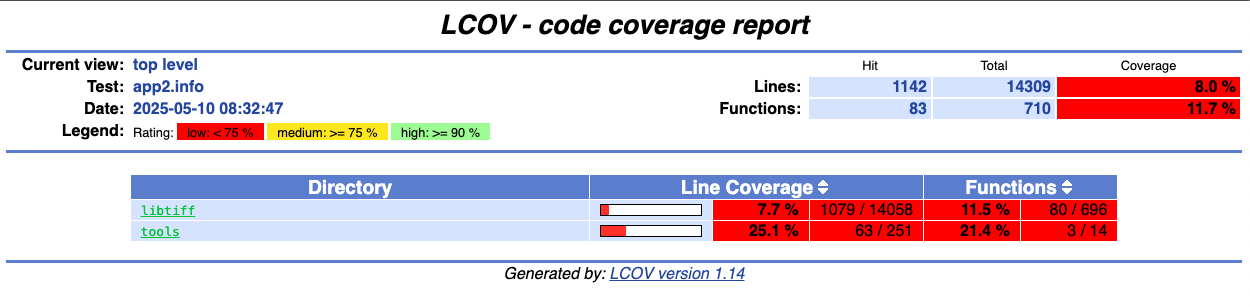
通过下面代码收集代码覆盖率
cd $HOME/fuzzing_tiff/tiff-4.0.4/
lcov --zerocounters --directory ./ # 重置以前的计数器
lcov --capture --initial --directory ./ --output-file app.info # 返回"baseline"覆盖数据文件,包含每个检测行的零覆盖率
$HOME/fuzzing_tiff/install/bin/tiffinfo -D -j -c -r -s -w $HOME/fuzzing_tiff/tiff-4.0.4/test/images/palette-1c-1b.tiff
lcov --no-checksum --directory ./ --capture --output-file app2.info # 将当前覆盖状态保存到app2.info文件中
生成HTML输出
genhtml --highlight --legend -output-directory ./html-coverage/ ./app2.info
./html-coverage/index.html
插桩编译
rm -r $HOME/fuzzing_tiff/install
cd $HOME/fuzzing_tiff/tiff-4.0.4/
make clean
export LLVM_CONFIG="llvm-config-13"
CC=afl-clang-lto ./configure --prefix="$HOME/fuzzing_tiff/install/" --disable-shared
AFL_USE_ASAN=1 make -j4
AFL_USE_ASAN=1 make install
开始fuzz
afl-fuzz -m none -i tiff-4.0.4/test/images/ -o out/ -s 123 -- $HOME/fuzzing_tiff/install/bin/tiffinfo -D -j -c -r -s -w @@
crash分析
tmin简化后
ayoung@ayoung:~/fuzzing_tiff/out/default/crashes$ cat tmin/tmin-id\:000000\,sig\:06\,src\:000000\,time\:17621\,execs\:6491\,op\:arith16\,pos\:55\,val\:-2
II*00000000
           00000000000000000000000000000000000000000000000000000000000000000000000000000000000000000000000000000ayoung@ayoung:~/fuzzing_tiff/out/default/crashes$ cat tmin/tmin-id\:000000\,sig\:06\,src\:000000\,time\:17621\,execs\:6491\,op\:arith16\,pos\:55\,val\:-2  | xxd
00000000: 4949 2a00 1000 0000 3030 3030 3030 3030  II*.....00000000
00000010: 0b00 0001 0300 0100 0000 3030 3030 0101  ..........0000..
00000020: 0300 0100 0000 3030 3030 3030 3030 3030  ......0000000000
00000030: 3030 3030 3030 0330 0200 0100 0000 3030  000000.0......00
00000040: 3030 3030 3030 3030 3030 3030 3030 1101  00000000000000..
00000050: 0400 0100 0000 3030 3030 3030 3030 3030  ......0000000000
00000060: 3030 3030 3030 3030 3030 3030 3030 3030  0000000000000000
00000070: 3030 3030 3030 3030 3030 3030 3030 3030  0000000000000000
00000080: 3030 3030 3030 3030 3030 3030 3030 3030  0000000000000000
00000090: 3030 3030 3030                           000000
报错堆溢出
影子内存显示[01]只有第一字节合法 但程序试图读取2字节触发溢出
=================================================================
==2650984==ERROR: AddressSanitizer: heap-buffer-overflow on address 0x602000000051 at pc 0x0000002bec12 bp 0x7ffefba54570 sp 0x7ffefba53d30
READ of size 2 at 0x602000000051 thread T0
    #0 0x2bec11 in fputs (/home/ayoung/fuzzing_tiff/install/bin/tiffinfo+0x2bec11)
    #1 0x4d39a8 in _TIFFPrintField /home/ayoung/fuzzing_tiff/tiff-4.0.4/libtiff/tif_print.c:127:4
    #2 0x4d39a8 in TIFFPrintDirectory /home/ayoung/fuzzing_tiff/tiff-4.0.4/libtiff/tif_print.c:641:5
    #3 0x358a27 in tiffinfo /home/ayoung/fuzzing_tiff/tiff-4.0.4/tools/tiffinfo.c:449:2
    #4 0x358a27 in main /home/ayoung/fuzzing_tiff/tiff-4.0.4/tools/tiffinfo.c:152:6
    #5 0x7f997818dd8f in __libc_start_call_main csu/../sysdeps/nptl/libc_start_call_main.h:58:16
    #6 0x7f997818de3f in __libc_start_main csu/../csu/libc-start.c:392:3
    #7 0x2a3d24 in _start (/home/ayoung/fuzzing_tiff/install/bin/tiffinfo+0x2a3d24)

0x602000000051 is located 0 bytes to the right of 1-byte region [0x602000000050,0x602000000051)
allocated by thread T0 here:
    #0 0x320c0d in malloc (/home/ayoung/fuzzing_tiff/install/bin/tiffinfo+0x320c0d)
    #1 0x370123 in _TIFFmalloc /home/ayoung/fuzzing_tiff/tiff-4.0.4/libtiff/tif_unix.c:283:10
    #2 0x370123 in setByteArray /home/ayoung/fuzzing_tiff/tiff-4.0.4/libtiff/tif_dir.c:51:19
    #3 0x370123 in _TIFFVSetField /home/ayoung/fuzzing_tiff/tiff-4.0.4/libtiff/tif_dir.c:539:4
    #4 0x369c66 in TIFFVSetField /home/ayoung/fuzzing_tiff/tiff-4.0.4/libtiff/tif_dir.c:820:6
    #5 0x369c66 in TIFFSetField /home/ayoung/fuzzing_tiff/tiff-4.0.4/libtiff/tif_dir.c:764:11
    #6 0x3a8e15 in TIFFFetchNormalTag /home/ayoung/fuzzing_tiff/tiff-4.0.4/libtiff/tif_dirread.c:5164:8
    #7 0x39abee in TIFFReadDirectory /home/ayoung/fuzzing_tiff/tiff-4.0.4/libtiff/tif_dirread.c:3810:12
    #8 0x49cc3b in TIFFClientOpen /home/ayoung/fuzzing_tiff/tiff-4.0.4/libtiff/tif_open.c:466:8
    #9 0x4effc2 in TIFFFdOpen /home/ayoung/fuzzing_tiff/tiff-4.0.4/libtiff/tif_unix.c:178:8
    #10 0x4effc2 in TIFFOpen /home/ayoung/fuzzing_tiff/tiff-4.0.4/libtiff/tif_unix.c:217:8

SUMMARY: AddressSanitizer: heap-buffer-overflow (/home/ayoung/fuzzing_tiff/install/bin/tiffinfo+0x2bec11) in fputs
Shadow bytes around the buggy address:
  0x0c047fff7fb0: 00 00 00 00 00 00 00 00 00 00 00 00 00 00 00 00
  0x0c047fff7fc0: 00 00 00 00 00 00 00 00 00 00 00 00 00 00 00 00
  0x0c047fff7fd0: 00 00 00 00 00 00 00 00 00 00 00 00 00 00 00 00
  0x0c047fff7fe0: 00 00 00 00 00 00 00 00 00 00 00 00 00 00 00 00
  0x0c047fff7ff0: 00 00 00 00 00 00 00 00 00 00 00 00 00 00 00 00
=>0x0c047fff8000: fa fa 00 00 fa fa fd fa fa fa[01]fa fa fa fd fa
  0x0c047fff8010: fa fa 00 fa fa fa 00 fa fa fa fa fa fa fa fa fa
  0x0c047fff8020: fa fa fa fa fa fa fa fa fa fa fa fa fa fa fa fa
  0x0c047fff8030: fa fa fa fa fa fa fa fa fa fa fa fa fa fa fa fa
  0x0c047fff8040: fa fa fa fa fa fa fa fa fa fa fa fa fa fa fa fa
  0x0c047fff8050: fa fa fa fa fa fa fa fa fa fa fa fa fa fa fa fa
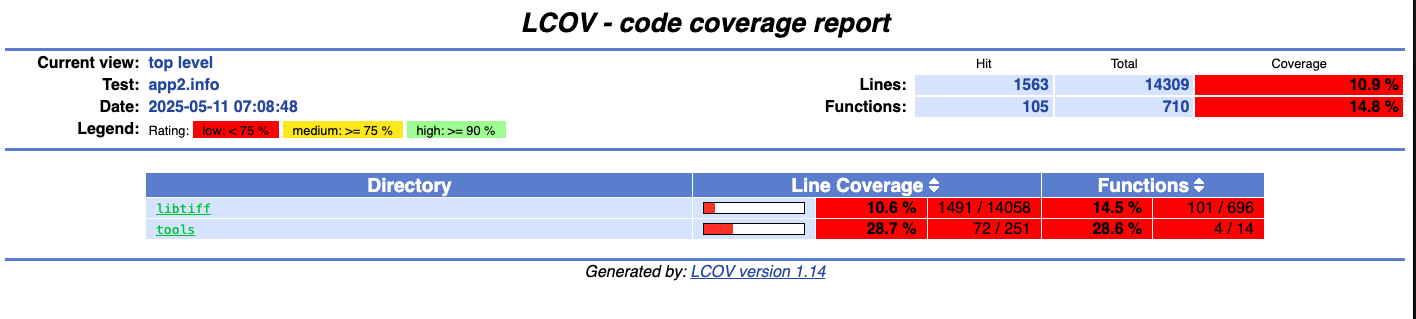
把所有crash跑了一遍 看代码覆盖率
exercise5
本节学习:
- 使用自定义字典帮助fuzzer找到新路径
- 使用多核并行fuzzing提高效率
fuzz
参考文档安装
ayoung@ayoung:~/Fuzzing_libxml2/libxml2-2.9.4$ ./xmllint --memory ./test/wml.xml <?xml version="1.0"?> <!DOCTYPE wml PUBLIC "-//WAPFORUM//DTD WML 1.1//EN" "http://www.wapforum.org/DTD/wml_1.1.xml"> <wml> <card id="card1" title="Rubriques 75008"> <p> <a href="rubmenu.asp?CP=75008&RB=01">Cinéma</a><br/> </p> </card> </wml>
下载xml示例和字典
SampleInput.xml
<!DOCTYPE a []>
字典
#
# AFL dictionary for XML
# ----------------------
#
# Several basic syntax elements and attributes, modeled on libxml2.
#
# Created by Michal Zalewski
#

attr_encoding=" encoding=\"1\""
attr_generic=" a=\"1\""
attr_href=" href=\"1\""
attr_standalone=" standalone=\"no\""
attr_version=" version=\"1\""
attr_xml_base=" xml:base=\"1\""
attr_xml_id=" xml:id=\"1\""
attr_xml_lang=" xml:lang=\"1\""
attr_xml_space=" xml:space=\"1\""
attr_xmlns=" xmlns=\"1\""

entity_builtin="<"
entity_decimal=""
entity_external="&a;"
entity_hex=""

string_any="ANY"
string_brackets="[]"
string_cdata="CDATA"
string_col_fallback=":fallback"
string_col_generic=":a"
string_col_include=":include"
string_dashes="--"
string_empty="EMPTY"
string_empty_dblquotes="\"\""
string_empty_quotes="''"
string_entities="ENTITIES"
string_entity="ENTITY"
string_fixed="#FIXED"
string_id="ID"
string_idref="IDREF"
string_idrefs="IDREFS"
string_implied="#IMPLIED"
string_nmtoken="NMTOKEN"
string_nmtokens="NMTOKENS"
string_notation="NOTATION"
string_parentheses="()"
string_pcdata="#PCDATA"
string_percent="%a"
string_public="PUBLIC"
string_required="#REQUIRED"
string_schema=":schema"
string_system="SYSTEM"
string_ucs4="UCS-4"
string_utf16="UTF-16"
string_utf8="UTF-8"
string_xmlns="xmlns:"

tag_attlist="<!ATTLIST"
tag_cdata="<![CDATA["
tag_close="</a>"
tag_doctype="<!DOCTYPE"
tag_element="<!ELEMENT"
tag_entity="<!ENTITY"
tag_ignore="<![IGNORE["
tag_include="<![INCLUDE["
tag_notation="<!NOTATION"
tag_open="<a>"
tag_open_close="<a />"
tag_open_exclamation="<!"
tag_open_q="<?"
tag_sq2_close="]]>"
tag_xml_q="<?xml?>"
关于fuzz参数的使用:
- -x:标记使用的字典
- -D:表示启用了确定性突变
- -M:表示主模糊器
- -S:表示从模糊器
- --valid:为捕获错误
开始fuzz 配置并行fuzz 主节点和从节点协同工作提高效率
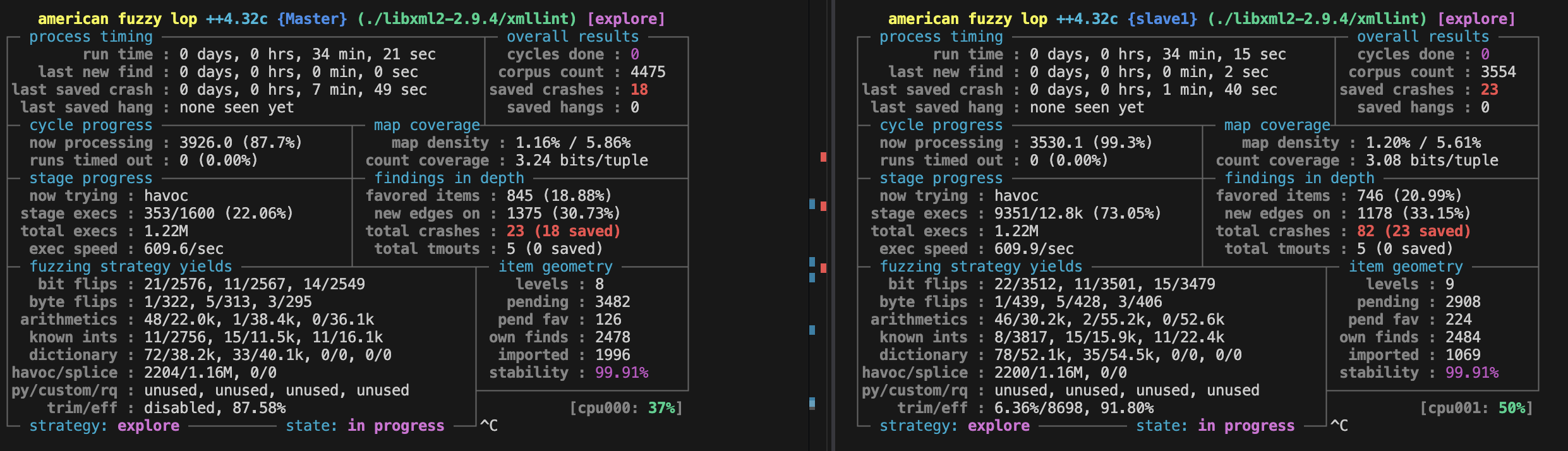
afl-fuzz -i afl_in/ -x dictionaries/xml.dict -o afl_out -D -M Master -- ./libxml2-2.9.4/xmllint --debug --recover --load-trace --nonet --postvalid --timing @@

afl-fuzz -i afl_in/ -x dictionaries/xml.dict -o afl_out -S slave1 -- ./libxml2-2.9.4/xmllint --debug  --recover --load-trace --nonet --postvalid --timing @@
afl-fuzz -i afl_in/ -x dictionaries/xml.dict -o afl_out -S slave2 -- ./libxml2-2.9.4/xmllint --debug  --recover --load-trace --nonet --postvalid --timing @@
afl-fuzz -i afl_in/ -x dictionaries/xml.dict -o afl_out -S slave3 -- ./libxml2-2.9.4/xmllint --debug  --recover --load-trace --nonet --postvalid --timing @@
参考官方和博客都没fuzz出东西
后面看了一下不知道为什么选项有点不一样。一开始没注意 选项一直报错 afl界面显示last new find : none yet (odd, check syntax!),其实就是启动的有问题了。后面把无效选项去掉就好了。
然后问了下ai怎么去重做后续分析 先统一所有crash到一起
mkdir -p ./all_crashes
find afl_out -type f -path "*/crashes/*" -exec cp {} ./all_crashes \;
使用alf-cmin去重(去掉了几十个重复的)
afl-cmin -i ./all_crashes -o ./unique_crashes -- ./libxml2-2.9.4/xmllint --debug --recover --load-trace --nonet --postvalid --timing @@
执行其中一个crash样本 asan报堆溢出 尝试读取超出分配内存范围的 1 字节,程序分配了4字节 但尝试读取第五字节
ayoung@ayoung:~/Fuzzing_libxml2$ ./libxml2-2.9.4/xmllint --debug  --recover --load-trace --
nonet --postvalid --timing all_crashes/id\:000000\,sig\:06\,src\:000763\,time\:264929\,exec
s\:159395\,op\:int16\,pos\:26\,val\:+1000
...
=================================================================
==1436429==ERROR: AddressSanitizer: heap-buffer-overflow on address 0x6020000001f4 at pc 0x0000003eb76e bp 0x7ffc7b473390 sp 0x7ffc7b473388
READ of size 1 at 0x6020000001f4 thread T0
    #0 0x3eb76d in xmlEncodeEntitiesInternal /home/ayoung/Fuzzing_libxml2/libxml2-2.9.4/entities.c:578:12
    #1 0x53921c in xmlNodeListGetString /home/ayoung/Fuzzing_libxml2/libxml2-2.9.4/tree.c
    #2 0x5cd3e5 in xmlValidateElement /home/ayoung/Fuzzing_libxml2/libxml2-2.9.4/valid.c:6401:14
    #3 0x3d075e in xmlValidateDocument /home/ayoung/Fuzzing_libxml2/libxml2-2.9.4/valid.c:6857:12
    #4 0x3d075e in parseAndPrintFile /home/ayoung/Fuzzing_libxml2/libxml2-2.9.4/xmllint.c:2819:7
    #5 0x3b7b66 in main /home/ayoung/Fuzzing_libxml2/libxml2-2.9.4/xmllint.c:3767:7
    #6 0x7fdb8f2f9d8f in __libc_start_call_main csu/../sysdeps/nptl/libc_start_call_main.h:58:16
    #7 0x7fdb8f2f9e3f in __libc_start_main csu/../csu/libc-start.c:392:3
    #8 0x2f81e4 in _start (/home/ayoung/Fuzzing_libxml2/libxml2-2.9.4/xmllint+0x2f81e4)

0x6020000001f4 is located 0 bytes to the right of 4-byte region [0x6020000001f0,0x6020000001f4)
allocated by thread T0 here:
    #0 0x3750cd in malloc (/home/ayoung/Fuzzing_libxml2/libxml2-2.9.4/xmllint+0x3750cd)
    #1 0x7484d7 in xmlBufResize /home/ayoung/Fuzzing_libxml2/libxml2-2.9.4/buf.c:827:26

SUMMARY: AddressSanitizer: heap-buffer-overflow /home/ayoung/Fuzzing_libxml2/libxml2-2.9.4/entities.c:578:12 in xmlEncodeEntitiesInternal
Shadow bytes around the buggy address:
  0x0c047fff7fe0: 00 00 00 00 00 00 00 00 00 00 00 00 00 00 00 00
  0x0c047fff7ff0: 00 00 00 00 00 00 00 00 00 00 00 00 00 00 00 00
  0x0c047fff8000: fa fa 06 fa fa fa 00 01 fa fa 00 01 fa fa 07 fa
  0x0c047fff8010: fa fa 00 03 fa fa 06 fa fa fa 00 01 fa fa 05 fa
  0x0c047fff8020: fa fa fd fd fa fa fd fa fa fa fd fd fa fa fd fa
=>0x0c047fff8030: fa fa 04 fa fa fa fd fa fa fa 02 fa fa fa[04]fa
  0x0c047fff8040: fa fa fd fa fa fa fd fa fa fa 02 fa fa fa 02 fa
  0x0c047fff8050: fa fa fa fa fa fa fa fa fa fa fa fa fa fa fa fa
  0x0c047fff8060: fa fa fa fa fa fa fa fa fa fa fa fa fa fa fa fa
  0x0c047fff8070: fa fa fa fa fa fa fa fa fa fa fa fa fa fa fa fa
  0x0c047fff8080: fa fa fa fa fa fa fa fa fa fa fa fa fa fa fa fa
...